Facebook

Schedule Facebook Page posts with room to actually say something

Facebook is the one channel where a link works properly and a longer post still gets read. Advanza schedules posts to your Page written for that, instead of reusing the Instagram caption.

From this one line

Autumn breaks — three nights for the price of two, booked before 30 September.

Facebook

Page post + link

Autumn is our favourite time of year here — quiet paths, proper sunsets, and the fire on from four o'clock. Stay three nights and pay for two, on any booking made before 30 September. Half term is already filling up, so if you've been meaning to come back, this is the moment. 👇

On Facebook

What Advanza does on Facebook

You approve it. Advanza handles everything else about getting it onto the platform properly.

  • Writes a longer, warmer post — Facebook readers will read past two lines
  • Attaches the campaign image and a working link, not a 'link in bio' fudge
  • Publishes to your Page on the schedule you approved
  • Can post the first comment too, when you want a follow-up under the post
Worth knowing

What's different about Facebook

The rules that make this channel its own job — and what Advanza does about each one.

Pages, not personal profiles

Facebook only permits scheduled publishing to Pages. If you run your business from a personal profile, you'll need a Page first — which you want anyway for the insights.

Links behave here

Facebook is one of the few channels where a link in the post body is fine. Advanza writes the post around that rather than pointing people at a bio link.

Multiple Pages, one approval

If you manage more than one Page, pick which ones a campaign goes to. Approving once publishes to all of them.

What you need to connect

  • A Facebook Page you're an admin of
  • Permission to manage posts on that Page
  • One approval — Advanza does the rest

Facebook is the channel where a link still works

Every other social platform makes you fight to get someone off it. Instagram gives you one link in a bio. LinkedIn quietly buries posts that contain a link. X will take one, but there is barely room.

Facebook takes a link in the body of the post and shows it as a proper preview card. That single fact should change what you write, and on most tools it does not — because the Facebook post is the Instagram caption again, ending in "link in bio" on a platform that has no bio.

Advanza writes Facebook as its own thing: longer, warmer, with the working link where a reader expects it. Facebook audiences will read past two lines, which is a luxury nowhere else on the list gives you.

Pages only, and why that is not really a limitation

Facebook's publishing API covers Pages. It does not cover personal profiles, on any scheduling tool that exists — this is a platform rule rather than something a product can work around, and any tool claiming otherwise is doing something you do not want done to your account.

If you currently run your business from a personal profile, you need a Page first. That is worth doing regardless: a profile has no admin roles, so the business lives or dies with one login, and there is no way to hand it to someone else.

Once the Page exists, connect it and Advanza publishes there on the schedule you approved. If you manage several Pages — locations, brands, a second venture — connect them all and choose which ones each campaign should reach. One approval covers every Page you ticked.

What a single approval actually sets in motion

The Facebook post is rarely the whole job. The same announcement usually needs to reach Instagram, your LinkedIn company page, and the email list you have spent years building — and each one wants something different enough that copy-pasting is visibly lazy.

Approving once in Advanza publishes the Facebook Page post with its link and image, the Instagram post with its caption and first-comment hashtags, the LinkedIn version with the link in the comments, the X version cut to fit, the Pinterest pin written for search, and the email to whichever segment you chose.

That is the difference the product is actually built around. Not scheduling — scheduling is a solved problem and there are free tools for it. The expensive part is producing six genuinely different pieces of writing from one idea, and that is the part that stops happening on a busy week.

What Advanza will not do on Facebook

Advanza publishes to Pages you have connected, and can post the first comment underneath. That is the extent of it.

It does not post to personal profiles, because Meta does not permit that. It does not post into Facebook Groups. It does not buy or manage ads — everything here is organic posting. And it does not sit in your comments answering people: reading and replying to what your audience writes back is yours, and it is the part of Facebook that still earns anything.

If you were hoping for a tool that runs the whole Page unattended, this is not that, and the ones that claim to be are usually posting things you would not have approved.

First comments, and being told when something did not work

Advanza can post a first comment on your Facebook Page post too, for a follow-up, a booking link, or the detail that would have cluttered the main post.

Like everywhere else, publishing the post and posting the comment are two separate steps, and the second one can fail on its own. When that happens the post stays published and the campaign carries an amber warning naming the comment as the part that did not go up.

That distinction matters more than it sounds. A red error on a post that actually published sends you to fix something that is not broken; a clean green tick on a post missing its link means you never look. Advanza reports the state that is true.

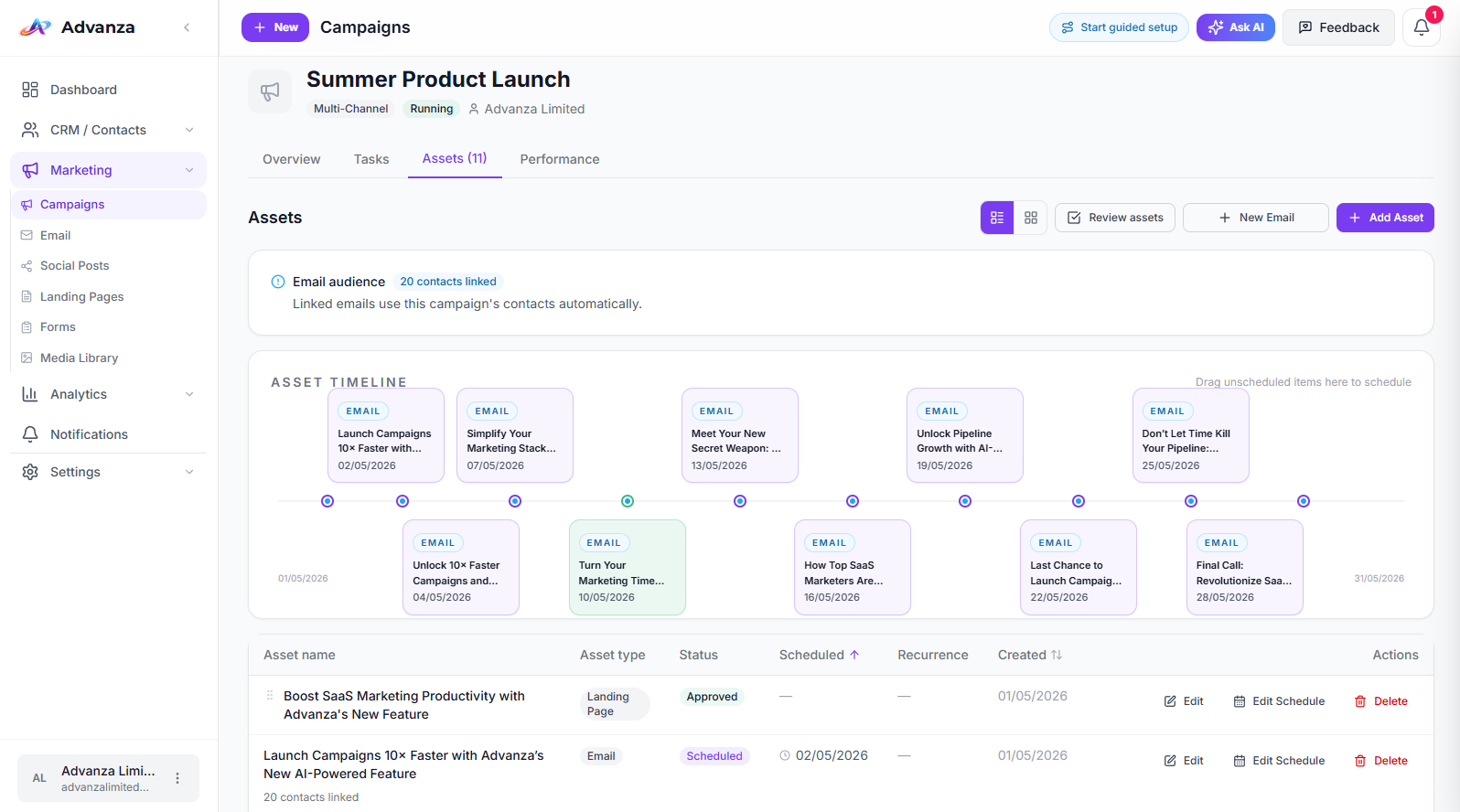
An Advanza campaign timeline showing each scheduled asset with its date and status
A Facebook post is one asset on a campaign timeline, next to the posts going to every other channel and the email going to your list — each with its own date and approval state.
How it compares

Publishing to Facebook: three ways

Facebook is easy to schedule to and easy to write badly for. The comparison worth making is about what gets written, not about the calendar.

Publishing to Facebook with Advanza, with a typical scheduler, or by hand
What is being comparedAdvanzaA typical schedulerBy hand
What the post saysWritten for Facebook, longer, with the linkThe Instagram caption againYou write it
The linkIn the post body, where it worksWhatever you pastedIn the post body
Multiple PagesPick per campaign, one approvalUsually supportedPost to each in turn
First commentOptional, posted automaticallyRarelyYou add it yourself
Everything else in the campaignFour more channels and your email listSame text, re-postedSeveral evenings

Scheduled publishing works to Facebook Pages only, never personal profiles — Meta's rule, on every tool.

Questions

Facebook, answered

Can Advanza post to my personal Facebook profile?

No. Facebook's publishing API covers Pages only. That's a platform rule rather than an Advanza limitation — every scheduling tool works the same way.

Can I publish to more than one Page?

Yes. Connect as many Pages as you manage, then choose which ones each campaign should reach. One approval covers all of them.

Does the same text go to Facebook and Instagram?

No — that's the point. Advanza writes a longer post with a working link for Facebook, and a shorter, more visual caption for Instagram, from the same underlying idea.

The same idea also goes to

Write it once. Post it to Facebook and everywhere else.

Start free, describe what you're promoting, and read what Advanza writes for each of your channels before a single thing publishes.

  • Start free
  • No complicated setup