Audiences

Say who you want to reach. Get the audience back.

Not everyone should get the same message. Describe the group you mean in ordinary words, and Advanza builds an audience that keeps itself up to date — ready for any campaign you point at it.

Why it's here

The same message to everyone is how people unsubscribe

Sending the right thing to the right group is the difference between a campaign that works and one that quietly annoys your list.

1
Sentence to start

Say it in a sentence

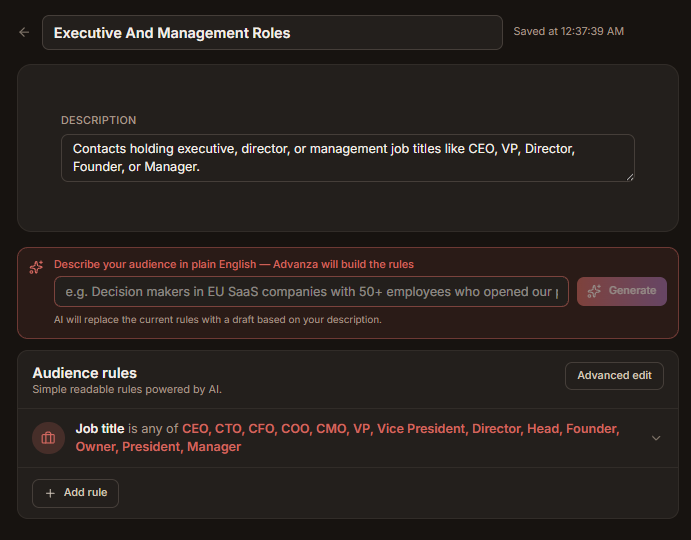
Describe who you want to reach the way you'd say it out loud, and Advanza turns it into the rules that find those people.

Live
Updates itself

It keeps itself current

People join and drop out on their own as things change. No exporting a list every time you want to send something.

Both
People and companies

People or businesses

Group individuals, whole companies, or both — using where they are in the conversation, what they've clicked, or anything you track.

Once
Built, then reused

Build it once, use it everywhere

The same audience works for an email, a social campaign, an automation and a report. You never rebuild it.

How it works

From a sentence to an audience you can send to

No query builder to learn, and no export to babysit.

  1. 01

    Describe them

    Something like: people who opened the pricing email last month and haven't replied yet. Plain words are fine.

  2. 02

    Check the rules it wrote

    They come back in readable English. Change one, or open the advanced view and nest the conditions yourself.

  3. 03

    See how many that is

    Advanza counts them before anything goes out, so you know whether you're writing to nine people or nine hundred.

  4. 04

    Point a campaign at it

    Use it as the audience for an email, a social campaign, an automation, or just to see how that group is doing.

Advanza audience builder
What's inside

Enough control to be precise, without a manual

Deep enough for the person who loves this stuff, simple enough for everyone who doesn't.

Describe it, don't build it

Say who you mean and get the rules back, explained in words you can check at a glance.

Simple view, or the full one

A readable list of rules by default. Nested any/all/none logic when you genuinely need it.

Filter on almost anything

Where they are in the conversation, what they clicked, when they last replied, or your own fields.

Audiences of people

By role, by owner, by how warm they are, or by anything you've recorded against them.

Audiences of businesses

By size, by industry, by what's open with them — for when you're talking to the company, not one person.

Membership looks after itself

It recalculates as your data changes, and you can force a fresh count right before a send.

Draft, publish, park

Work on one privately, publish it when it's right, copy it to make a variation, archive it when it's done.

Works with everything

Email, social, automations and reporting all draw from the same shared library of audiences.

One audience, every campaign

Build it once and stop thinking about it

An audience you publish here is the audience your emails, your social campaigns, your automations and your reports all work from — so nobody's sending to a list that went out of date in March.

Build your first audience in a sentence

Start free, describe the group you have in mind, and see how many people are actually in it.

  • Start free
  • No complicated setup